|
|||||||


|
|
|
Thread Tools | Display Modes |
|
|||||||
|
|
|
|
Thread Tools | Display Modes |
 07-08-2010, 02:59 PM
|
#1 | ||

   Join Date: Aug 2007
Location: Dixmuide, Belgium
Posts: 2,767
|
 Win 7 64 Windows XP mode / VPC [Basic howto]
If you're on Win7 64 you already know that you can forget running 16 bits ol'windows software on it.
Solution is to install Windows XP mode and Virtual PC for Win7 64. The program is to download directly from Microsoft, freeware. First you need to download Windows XP mode and VPC for Win7 64: (click on pics to enlarge)  Notice: you will need to validate your Win 7 to be allowed to download/install the software.  Install the stuff.... 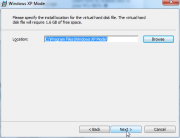 Remark: you need Windows XP mode ànd VPC. Run Windows XP mode .... 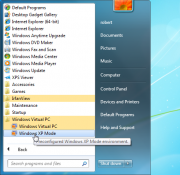 Some setup screens (you only get those at first run..) 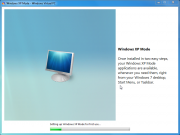 Seen this one before ....  ...and this, this gonna take a while, time for a coffee break....  Basic install with 512MB, you can adjust memory settings, highly recommended, some 1-2GB RAM won't hurt (if your host can take it). 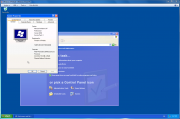 That's a nice addition , it's now finally possible to attach an USB key/drive in your Windows XP mode  High time to run something ...  Oh yeah, a little bit sluggish, but it runs 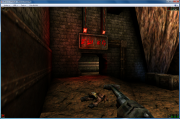 (BTW, you'll need a pretty high end host PC to get Unreal running in Windows XP mode, just saying, but most ol'16 bit games/software will run fine in software modus). When installing Windows XP mode you also have Virtual PC installed. Let's try some stuffs: W98SE 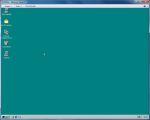 WinME 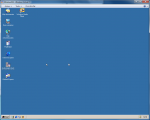 W2K  And this is just for fun you're better off with dosbox ..... 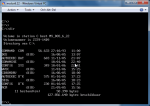 [Edit 10-12-2011] It's been a while now, had time to test a lot of things with XP mode under Win7. Have to say it's a great soft to run old applications or use old printers that refuse to run-work in Win7, but for gaming it's a let down. Not that surprising, after all it was never meant as gaming platform. For gaming purposes I advise VPC2007(sp1) with W98SE or XP, not XP mode.
__________________
Not a member of The Victorious People's Shoutbox Liberation Army. Not a member of the GAG Guerrilla. Don't get A Grip! FOR RENT *Advertising space* Last edited by dosraider; 10-12-2011 at 01:38 PM. Reason: grmmmmmmmmmpffffffffffffffffffffffffffffffffffffffffffffffffffffffffffff |
||


|
|
|
08-08-2010, 03:46 AM
|
#2 | ||
   Join Date: May 2008
Location: Pittsburgh, United States
Posts: 59
|
It also works using Vmware player. VMware player will auto detect & setup Xp mode automatically after you tell Vmware where you downloaded/copied the Xpmode folder to.
|
||
|
|
|
|
29-06-2011, 02:01 AM
|
#3 | ||
  Join Date: Jun 2011
Posts: 1
|
Home Premium Users
So, I went to the microsoft website to try and download said software, and it tells me that I'm not eligible. Does that mean that it won't RUN on my computer? Or does that just mean that Microsoft are the greedy jerks I think they are and won't give it to me for free like they would if I shelled out an additional couple-hundred dollars to upgrade my perfectly fine OS to an even bigger beast?
|
||
|
|
|
|
29-06-2011, 05:32 AM
|
#4 | ||
|
Join Date: Aug 2007
Location: Dixmuide, Belgium
Posts: 2,767
|
You get what you paid for.
If you ain't happy with it contact MS and bitch there. Of course, you could also simply down and install VPC2007 and install W98Se or XP in it. That works on a 'home' license Even if you get a warning, simply ignore it. And if you don't like MS, don't buy windows, enough alternatives, even free ones.
__________________
Not a member of The Victorious People's Shoutbox Liberation Army. Not a member of the GAG Guerrilla. Don't get A Grip! FOR RENT *Advertising space* |
||
|
|
|
|
30-06-2011, 02:16 AM
|
#5 | ||

  Join Date: Mar 2006
Location: ,
Posts: 4,613
|
This is the link for Windows versions previous to 7:
http://www.microsoft.com/windows/vir...l-pc-2007.aspx As Dosraider said, if you have a Home edition of Windows you may see a disclaimer about not being supported, but discard it and the program works all the same. I'm quite mad at MSFT because what they've done to us Vista license holders. Windows 7 has only very minor changes (its internal version number is 6.1.x instead of 7.x), it could have been a SP for Vista, but they decided to declare a new version as a publicity stunt, because Vista was hugely unpopular for no reason. All that is OK, but now not only are we barred from the GUI improvements in 7, we're also left in the dark with the new virtualization tools, and we have to make do with the legacy ones. It would have been no effort on their part to make the same program available for other versions, at least Vista which has the exact same architecture. Not doing so is their best excuse for 7 being a whole new version, and yet an outrageous insult to the people who put their money on Vista, which is their product that they sold to us, but they've spurned it.
__________________
Life starts every day anew. Prospects not so good... |
||
|
|
|
|
09-12-2019, 03:20 AM
|
#6 | ||

Join Date: Oct 2006
Location: Asenovgrad, Bulgaria
Posts: 2,532
|
 Yes, XP mode is great!!
Hi, dear mates,
Yes, I want to confirm the words about the wonderful XP mode option ... For me, the game Dungeon Siege could not start because I use Windows 7 Pro. But I installed XP mode and the game started .. Hooray! Thank you. OFF, sry, But I noticed something strange. The game uses Russian because I prefer it to English. However, the text is in English, and some characters use or Russian or English. Settings lack the option to choose ... Strange! .. Many years ago I bought a wonderful scanner ... But raising the OS it turned out that this printer had a driver supported only by XP. And I was forced to throw it away. But it had a huge scanning surface that today's scanners don't have. So pathetic ... 
__________________
 Do not make personal remarks - said Alice. Do not make personal remarks - said Alice.
|
||
|
|
|
|
09-12-2019, 07:14 PM
|
#7 | ||

    Join Date: Mar 2009
Location: Cherkessk, Russian Federation
Posts: 2,078
   |
Quote:
 Did you use Russian version? Where did you set it to English? Did you use Russian version? Where did you set it to English?
__________________

|
||
|
|
|
|
11-12-2019, 04:55 PM
|
#8 | ||
|
Join Date: Oct 2006
Location: Asenovgrad, Bulgaria
Posts: 2,532
|
This game (my installation) is strange mix of Rus and Eng
Quote:
 Dear (Дорогой) and well respected Smiling Spectre, i DL this game using the Russian program uBar. This is a Russian version but some texts are English. Pls, see my pics. I like this old RPG. Off, sry I want to express my thanks to nice Capo the master of games. Some time ago he was so kind to recommend me Pillars of Eternity 1&2. Masterpiece!! Well, all games recommended from Master Capo were wonderful. He is very clever man. 
__________________
Do not make personal remarks - said Alice.
|
||
|
|
|
|
12-12-2019, 01:39 AM
|
#9 | ||

Join Date: Jan 2006
Location: Little big small world
Posts: 1,906
|
Well, from my (very limited experience) any originally English games, are best played in English, the only more or less thoroughly translated ones would be those done by Бука, and that only, if that Russian company actually took on translating those games, and if those games were translated for actual Russian audience. Please correct me if I'm wrong, my experience with those specifically translated games is longer than a decade by now.
Other than that, I'd very highly recommend the English language setting, for the most authentic spoken experience in a game, speaking from experience there - with the Big Exception of Baldur's Gate II + addon, which I tested in both German and English languages, and found the German language speech much more appealing and characteristic, than English default version. But that is a rare exception for a purely English game, mind you. Edit: Actually, from what I know, at least Pillars of Eternity 2 - Deadfire doesn't even have a German translation yet, despite having one new DLC released already, which I'd think there's even less chance of a Russian translation, not entirely sure on the first PoE though. Edit 2: About Dungeon Siege, that is a very old game by now. And looking up online, it doesn't look like there's any Russian fanbase about that game, much less any translation to that game. It fits my bit limited experience as well, that really few games ever get translated to that language, and even less so now, than about 6-7 years ago. Also, specifically as a recommendation for Yoga - Tyranny imo beats both Pillars of Eternity games, while being also from Obsidian. More masterpiece?  Last edited by Scatty; 12-12-2019 at 02:04 AM. |
||
|
|
|
|
12-12-2019, 04:02 AM
|
#10 | ||
|
Join Date: Oct 2006
Location: Asenovgrad, Bulgaria
Posts: 2,532
|
Naturlich (Of course)
Quote:
 Sehr geehrter Scatty, Sie haben wie immer absolut Recht. Aber was mache ich (ich bin immerhin slawisch) und liebe Russisch mehr als Englisch? (Dear Scatty, You are, as always, absolutely right. But what do I do (I'm Slavic after all) and love Russian more than English?) OFF, sorry Can any good soul tell me How to find out where the game experience is? How are my characters raising their level? By how many points do the three options increase: Strength, Agility and Mind? Interesting - no charisma! Thanks in advance. Dear Scatty, thank you very much for the recommended game. I really need recommended games because unfamiliar RPGs are decreased constantly.  (very politely) I passed 68 RPG. Yes, i know this number is very small against huge numbers of Capo, Scatty and SS, but i never stop playing the games.
__________________
Do not make personal remarks - said Alice.
|
||
|
|
|
|
|
 Similar Threads
|
||||
| Thread | Thread Starter | Forum | Replies | Last Post |
| Ubuntu xx.xx + dosbox [basic howto] | dosraider | Tutorials | 14 | 27-01-2015 09:39 AM |
| Dosbox 0.73 and Windows 7 [Basic howto] | dosraider | Tutorials | 4 | 04-08-2010 02:30 PM |
| Dosbox 0.73 on USB XP/Vista [basic howto] | dosraider | Tutorials | 2 | 02-10-2009 04:57 PM |
| Dosbox 0.73 and Vista [Basic howto] | dosraider | Tutorials | 7 | 10-07-2009 10:34 PM |
| Dosbox 0.73 and XP [Basic howto] | dosraider | Tutorials | 0 | 28-05-2009 03:27 PM |
|
|
||


 Linear Mode

